
Transferring files from your own machine into DaDesktop
One of the most frequently asked-for additions is the option to copy files from a Trainer's personal laptop or desktop directly into DaDesktop. These could be slide decks, installation ISOs for setting up a nested virtualisation system to enable several servers and desktops to be used, or simply any files you need for a particular training course.
We've built a straightforward drag-and-drop file transfer feature into the newest Windows 10 and most Linux templates. Now you can just drag files from your own device right into the DaDesktop machine in Germany.
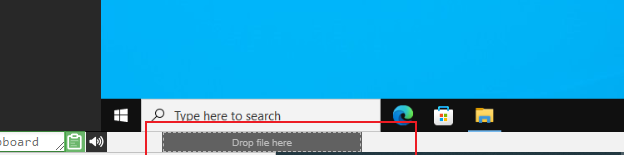
For now, you can only move one file at a time, but if you need to transfer multiple files, just bundle them into a zip archive and drag that over too. The transfer splits data into chunks for efficient delivery, so it works best over a fast fibre connection. Any folder structure inside the archive (like in a zip file) is kept intact.
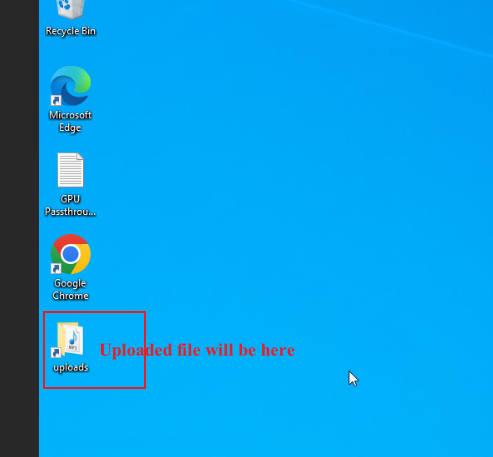
On Linux templates, we haven't yet added a desktop shortcut for the Uploads folder as we have on Windows. Instead, you'll find the files at :-
/home/student/uploads-to-dadesktop
In summary :-
OS Templates that currently have this feature enabled
- Debian 12 - v20240314 and newer
- Ubuntu 22.04 - v20240314 and newer
- Ubuntu 24.04 - v20240314 and newer
- Windows 10 - v67 and newer
OS Templates that do not have this feature enabled (as yet)
- Debian 11
- Almalinux
- Kali-linux
- Any older versions of the templates
We'll be rolling out more additions to this early-release feature soon.
If you have any thoughts or questions, please reach out via the DaDesktop Technical support chat.